> For the complete documentation index, see [llms.txt](https://sync.wiki.mksdtech.com/llms.txt). Markdown versions of documentation pages are available by appending `.md` to page URLs; this page is available as [Markdown](https://sync.wiki.mksdtech.com/collaboration/live-previews.md).
# Live Previews
Stream display-only previews of your edits to teammates before you synchronize.
Live previews let teammates watch your work before you synchronize. Rhino Sync draws your edits in their viewports, in your colour.
Previews are for display only. Nothing is written to a teammate's model until you synchronize and they reload.
Objects on layouts, text dots and point clouds have no live preview. Teammates see them after you synchronize and they reload.
Previews pass only between teammates on the same Rhino Sync version.
## Open Live Previews
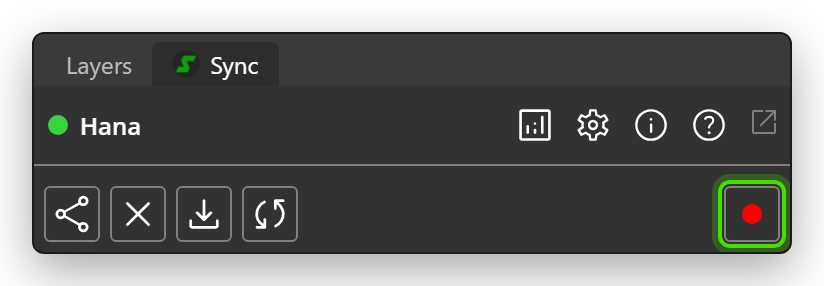
Click the dot at the right of the toolbar, **Live preview broadcasting**.
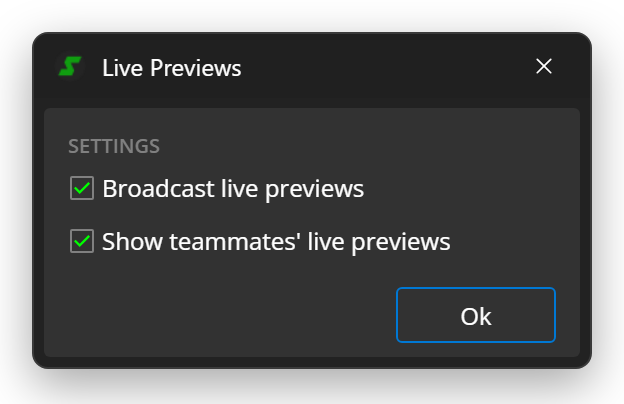
| Option | What it does | Default |
| --------------------------------- | -------------------------------------------- | ------- |
| **Broadcast live previews** | Streams your edits to teammates as previews. | Off |
| **Show teammates' live previews** | Draws previews teammates broadcast. | On |
Click **Ok** to apply. The same options are in [Settings](/reference/settings.md).
## Broadcast your edits
1. Select **Broadcast live previews** and click **Ok**.
2. Collaborate as usual.
About 2 seconds after Rhino Sync accepts an edit, it sends a preview. The dot turns red while you broadcast, and a red dot appears after your name in **Users**.
| Dot | State |
| ----- | --------------------------------------------------- |
| Grey | Broadcasting is off. |
| Green | Broadcasting is on. It starts when you collaborate. |
| Red | You are broadcasting. |
## See a teammate's previews
1. Keep **Show teammates' live previews** selected.
2. In **Users**, click the circle next to the teammate to turn on their colour.
Rhino Sync draws that teammate's previews in their colour, in place of the objects they changed. To get the real geometry, wait for them to synchronize, then click **Reload**.
{% hint style="info" %}
You only see previews from teammates whose colour is turned on in **Users**. Until you turn someone on, they send you nothing.
{% endhint %}